Template editor
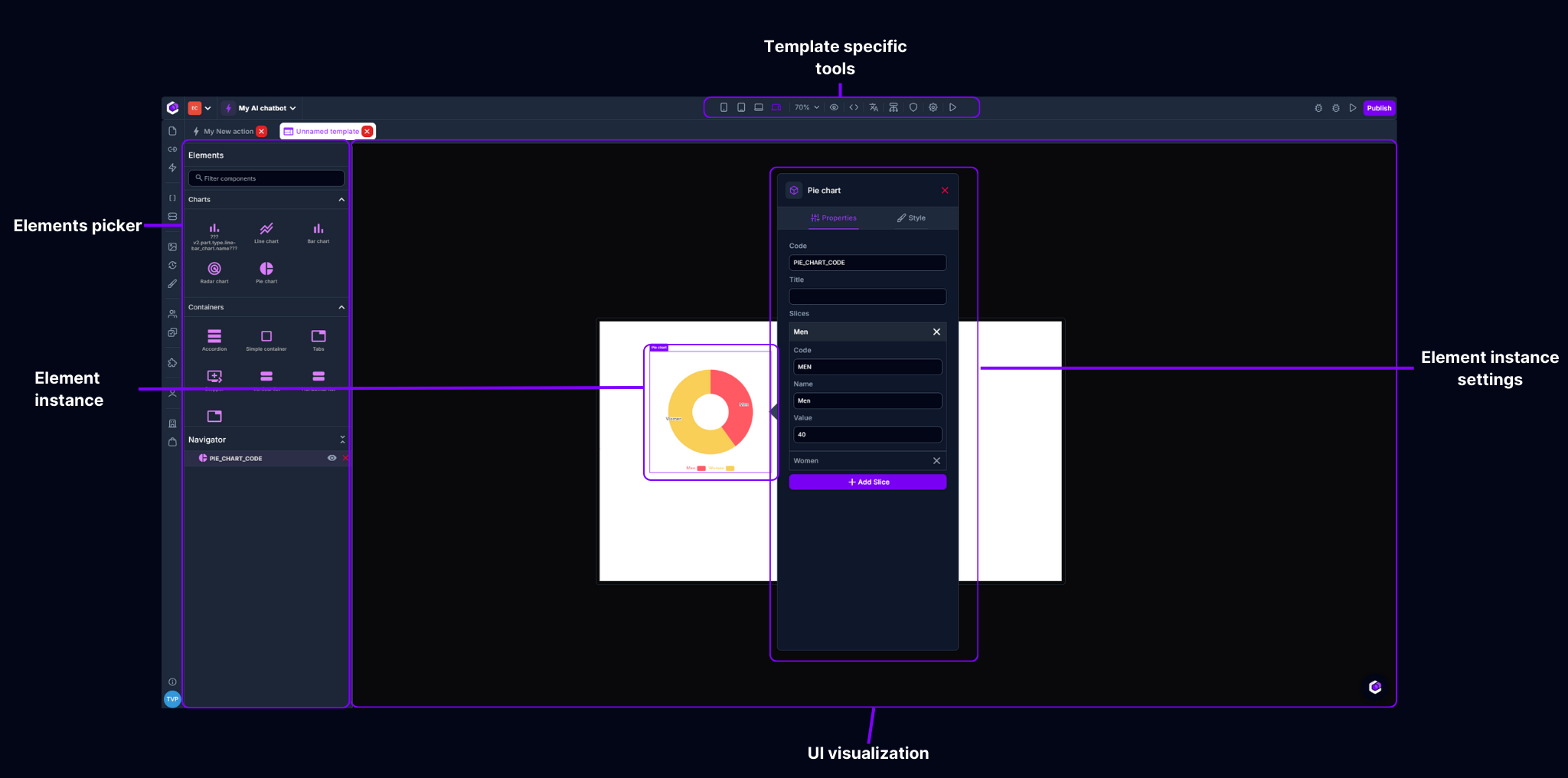
Elements picker
The elements picker lets you find the elements you need out of our extensive library of predefined, ready to use UI elements. Just drag & drop the element you need into place & start creating your beautiful user interface.
Element instance
A element instance is a certain configuration of UI element. This means that the chosen element will be visualized in your applciation with the definece configuration.
Element instance settings
Every element has its unique set of configuration options. You can configure functions by clicking on the "Element instance". This will allow you to configure: element specific settings, element specific style settings & element specific action triggers
UI visualization
This entire space is used to visualize a preview of your user interface. This space can be panned by clicking + dragging the mouse & can be zoomed in/out by using the zoom control in the "Template specific tools" or by using the ctrl + mouse wheel.
Template specific tools
These tools help you building actions. Possibilities here are: switch screentype, zoom in/out, toggle/configure grid, multilanguage settings, configure page hierarchy, configure authentication/authorization, template settings & Testing your UI.